Build with Claude Code, Host in Microsoft: Copilot Managed Runtime for Internal Apps
This blog post is about the three things that slow me down every time I build an app with Claude Code, and how Copilot Managed Runtime (CMR) took most of that work off my plate. I have built several apps this way, including Patriot Academy, AIShield365, and a handful of internal tools. Claude Code writes the code quickly. Then the real work starts.
TL;DR, if you already own Power Apps Premium licenses and the app is for internal use, I highly recommend CMR. The one big unknown is how many Copilot Credits your app will burn, and I will report real numbers in a follow-up post.
The Three Walls
Every app I build hits the same three walls before a single user can open it.
- Hosting. Pick a platform (Azure Static Web Apps, Vercel, or something else), wire up the deployment pipeline, set the environment variables, and keep it patched and monitored. None of that is hard, but it is different on every platform and it never ends.
- Identity. For an internal app, users should sign in with their Microsoft 365 account. That means an Entra app registration, redirect URIs, consent, token handling, and a sign-in that survives your Conditional Access policies. I have lost more afternoons to this than to any bug in my own code.
- Persistent storage. Where does the data live? A database, a SharePoint list, a storage account? Each answer comes with its own security model, its own bill, and its own way of being configured wrong.
I like Copilot for what it does inside Office and Teams. I was not ready to give up Claude Code for building apps, though. Then I found the Copilot Managed Runtime SDK, and it turned out I did not have to choose. I develop with Claude Code, then publish into a managed environment that Microsoft hosts inside my tenant.
What Is Copilot Managed Runtime?
Microsoft's overview page (here) defines it in one sentence:
"Copilot Managed Runtime hosts Microsoft 365 line-of-business applications that automatically inherit organizational governance, security, and compliance controls from the moment they're created."
The page goes on to say that whichever tool builds the app, the resulting app "runs in a Microsoft-hosted environment, uses Microsoft Entra authentication, follows tenant governance policies, and is visible to admins in the Microsoft 365 admin center."
In plain terms, you build the app, and Microsoft handles the place it runs, the sign-in, and the admin controls. Microsoft lists four ways to create an app that runs on it:
| Path | Who it is for |
|---|---|
| Copilot Cowork | Business users who describe an app in chat |
| Microsoft Copilot Studio | Makers who want more control over build, preview and publish |
| Copilot Code | Business users and developers who want an AI coding agent |
The CMR SDK and CLI (ms CLI, @microsoft/cmr-apps) |
Professional developers who want a code-first workflow |
Microsoft says all four paths produce the same kind of artifact: an app that inherits your tenant's default governance policy (approved connectors, sharing rules, content security policy) and shows up in the admin inventory. I used the fourth path, the SDK and CLI, with Claude Code doing the typing.
Which pain points does it solve?
Here is how the three walls map to what CMR does.
- Hosting: Gone. I run
ms app buildandms app deploy, and the app runs in a Microsoft-hosted environment. No pipeline to build, no platform account to manage. - Identity: Apps use Microsoft Entra authentication. In my code,
getUser()from the SDK returns the signed-in user, and I did not register an Entra app by hand. - Storage: CMR can attach a Fabric database backend with one command,
ms app add backend --provider fabric. I cover the choices in a section below. - Admin visibility: This was a surprise bonus. The apps show up in the Microsoft 365 admin center, so your admins can see them. I would have had to build that visibility myself on Vercel.
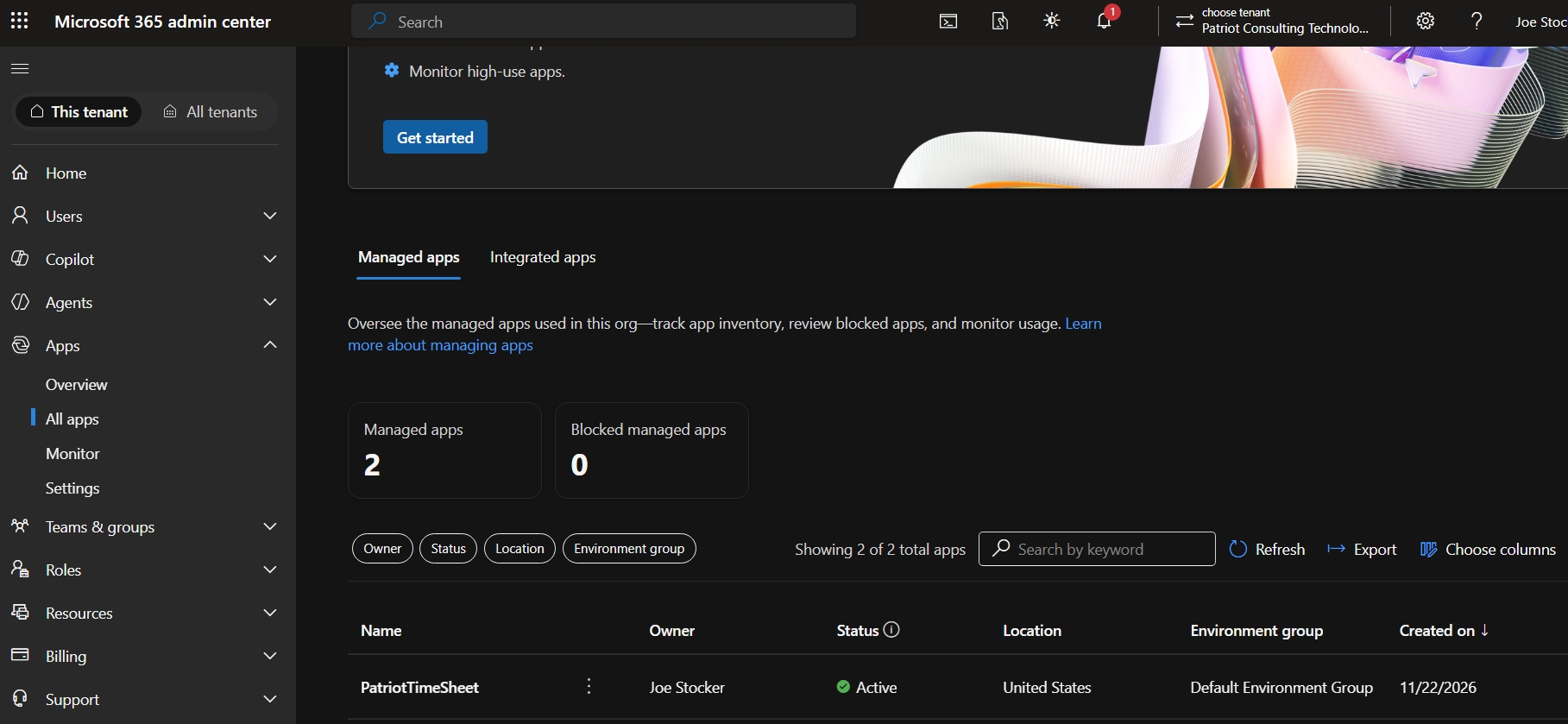
The Managed apps tab under Apps > All apps in the Microsoft 365 admin center. The app I published shows up with its owner, status, location and environment group.
What IT Admins Get
Microsoft's admin overview (here) says every app appears in the Microsoft 365 admin center "with its owner, location, dependencies, usage, and health, whichever tool built it." There is more to it than an inventory, though. From the same page, admins can:
- Block an app that doesn't meet your policies and follow up with its owner.
- Review and take over the default governance settings, which control what apps can connect to, who they can be shared with, and what external content they can load.
- Assign admin roles, including read-only access for reporting, security or support.
- Monitor reliability and performance, set alerts, and review consumption and requests for more credits.
- Decide whether every maker can build apps from day one or whether to start with a pilot group.
That last point matters more than it looks. The overview has a table of the ways people can create apps, and how you control each one:
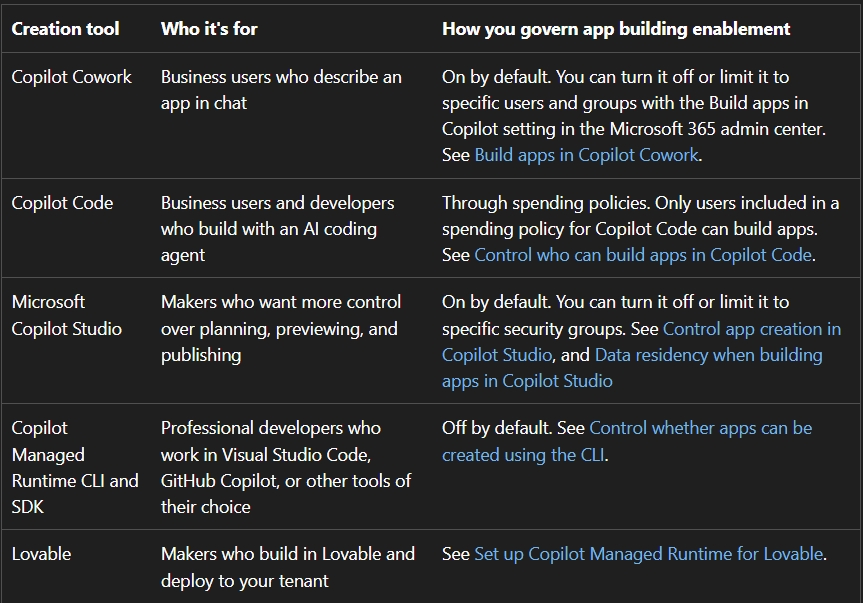
App building options and how admins govern them, from the Microsoft 365 admin documentation (linked above).
If you haven't touched these settings yet, you may be surprised. Per that table, Copilot Cowork and Microsoft Copilot Studio are on by default. Business users can describe an app in chat and have one built, and makers can build one in Copilot Studio, unless you turn those off or limit them to specific users and security groups. Copilot Code works through spending policies, so only users in a policy for it can build apps. The CLI and SDK path I used is off by default. Lovable has its own setup page.
In my opinion, every IT admin should read that table this week, before a business user builds an app on a Friday afternoon and shares it with the whole department. Decide who gets to build, decide whether to pilot first, and then turn the defaults you don't want off.
What It Costs
This is not free, and the docs do not put the costs in one place. There are two things to budget for.
1. To run an app, each user needs Power Apps Premium OR Copilot Credits, not both. Microsoft's admin overview says running an app "requires either a Power Apps Premium license or Copilot Credits through a spending policy that includes Copilot Managed Runtime." I assigned Power Apps Premium to the people who open my apps. If you already own those licenses, that cost is already paid for, which is why I call this a near no-brainer for internal apps. If you do not own them, the math changes quickly.
2. To use Fabric as the back-end storage, you need a Fabric license AND Copilot Credits. The Learn page for the integration (here) says "To use Fabric as a backend for Copilot Managed Runtime apps, you need both": one of the Fabric licenses it lists (Power BI Premium Per-User, Power BI Pro, or Fabric Free), and Copilot Credits usage-based billing enabled. So the same app can need one license-or-credits answer for running it and a license-and-credits answer for storing its data. In my opinion, this continued licensing complexity will likely slow adoption.
3. Watch your Copilot Credits limit. I found this out the hard way. My first ms app deploy failed with HTTP 429 (too many requests). Builds and previews kept working, which made it confusing. As soon as I raised the Copilot Credits spending limit in the Microsoft 365 admin center, the next deploy went through. I could not confirm from the error alone why it was limited, so raise that limit before your first deploy.
My notes put the runtime rate at 0.1 Copilot Credit per API call at $0.01 per credit, about $1 per 1,000 calls. TBD: confirm that against the current Copilot Credits Guide before you plan around it.
The email nobody warned me about
When you publish and share an app, Microsoft sends each user an email telling them an app was shared with them. The docs did not make that clear to me. Here is what the end user receives:
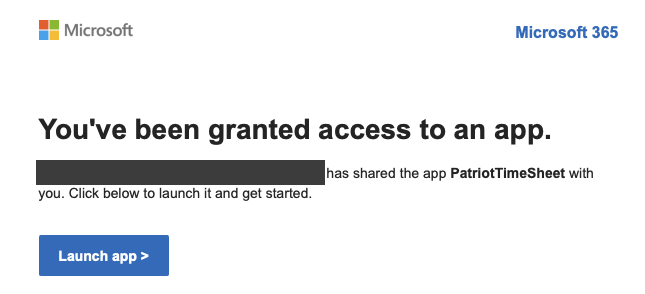
Several of my users reached out to ask whether this email was a phishing simulation. It is a plain message with a button to click, which is exactly what a phishing test looks like. The lesson learned: tell your users before you publish the app, or they may not trust it. (Sender name redacted.)
Finding the app later
If a user loses that email, they can find the app at managedapps.cloud.microsoft. Microsoft describes this portal as the day-to-day landing page for app users, separate from the developer tools and separate from the admin center. Put that URL in your rollout email too!
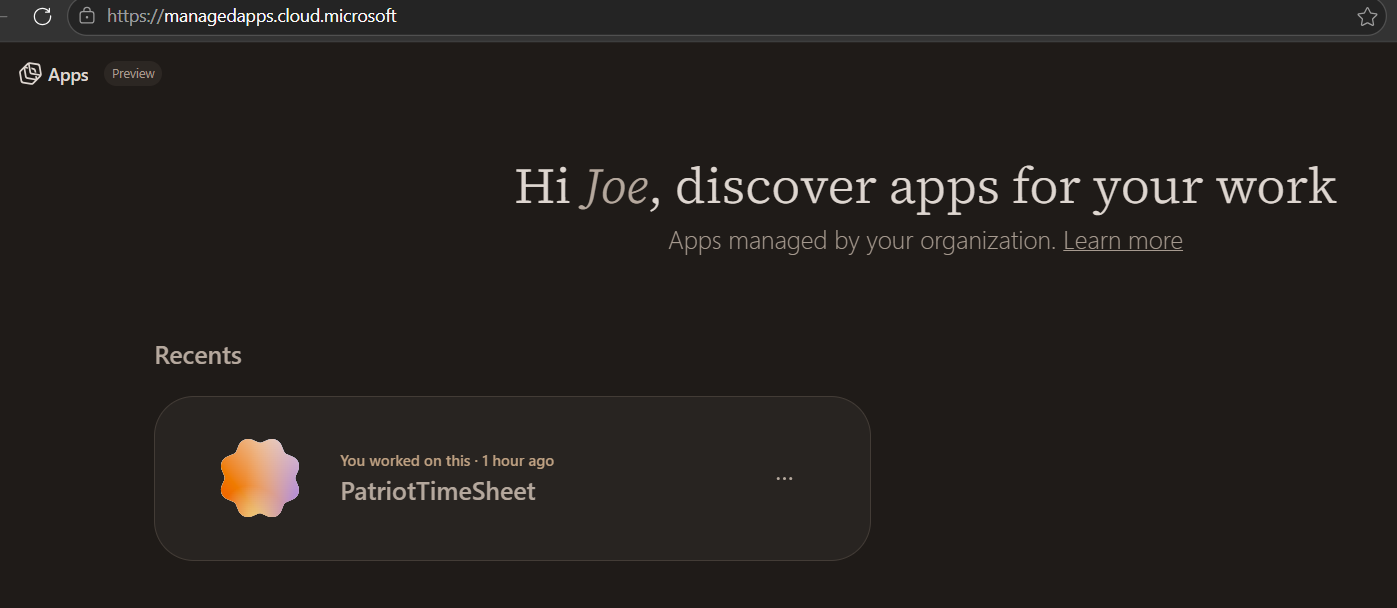
The managedapps.cloud.microsoft landing page, with the app I published under Recents.
One thing I would like to see: these apps showing up in the My Apps page (here) too. Many organizations have already taught their users to start at My Apps as the one place to launch everything. Those users now have to remember a second page for CMR apps. In my opinion, that would be an easy win for adoption.
Choosing a Backend
You get more than one place to keep data, and the choice matters more than it looks. I was building a California timesheet app, where the records have to be tamper-resistant. The question was whether to use a Fabric SQL database or a plain SharePoint list. (Any app with data people might want to change after the fact would raise the same question.)
I did not want to debate it from the documentation. Instead I built one tiny app, a text box and a Submit button, and pointed it at both backends. Then I added a button for each trust requirement the real app would need, and each button logged exactly what the server said. For example, one button tried to edit a saved row, one tried to delete it, and one tried to create a row owned by someone else. Every question from the requirements list became a button, so I was not testing "does it work", I was testing "does it enforce what I need".
Here is what I measured:
| Requirement | Fabric database | SharePoint list |
|---|---|---|
| Save from the app | Works | Works (after creating a Power Apps connection and allowing the app to use it) |
| Create rows but block edit and delete | Yes. The API never generates update or delete for a create/read entity | No. Update and delete both worked under default permissions |
| Reject a row claiming a different owner | Yes, rejected by the row policy | Owner is set by the system, so the app cannot forge it |
| Each user sees only their own rows | Policy engine supports it (tested with one account) | Not available through the connector |
| A manager sees their reports' rows | Works | Not available |
| Date-range queries | Works | Works |
Fabric was the only backend that enforced append-only rows and row ownership on the server. For a timesheet, that decided it. If the data is low-risk and "audit and approve" is good enough, a SharePoint list is the simpler path and carries no database charge.
One honest limit: I tested the own-rows policy with a single account, using a trick where I wrote rows owned by someone else and confirmed they did not come back. A real second user is still the proper proof, and it is on my list.
What the Fabric backend costs
I could not find a measured number, so I built an estimate from Microsoft's published billing rules and the public Azure Retail Prices API. The assumptions:
- The Fabric database bills about 1.74 capacity units while online, with a 2 GB minimum memory.
- The price I read from the Azure Retail Prices API was $0.18 per capacity-unit hour.
- Compute stops after 15 idle minutes.
At about $0.63 per hour online, 3, 8, or 12 online hours a day works out to roughly $41, $110, or $166 a month. Add about $2 for the GraphQL calls plus a little storage and I land at $45 to $180 per month for the whole company.
That is an estimate, not a measurement. The Microsoft 365 admin center (Copilot > Cost management) showed 0 credits and $0.00 after my tests, and billing lags by a day or two. I scheduled a reminder to read it again on November 24th, and that data will go into the follow-up post.
Gotchas I Hit
These cost me real time, so here they are in the order I would want to know them.
- An entity with no permission rule lets every signed-in user in. Set an explicit permission on every table, every time.
- Preview and live use separate databases. I tested a full cycle in preview, then opened the live app and found it empty. Set up your starting data in both.
- Share with one security group, not individual people.
ms app sharetakes a group's object ID. Sharing only opens the door, so you still need to add people to the app's own roster. - Pin every
@microsoft/rayfin-*package to the same version. A mismatched package broke the build until I aligned them. - A restrictive Content Security Policy is on by default. Per the Microsoft Learn page on it, no calls to outside hosts and no CDN scripts or fonts, unless an admin changes the policy. Ask early if you need an outside endpoint.
- Bulk data entry in the browser is slow. I built a small "paste JSON" import dialog with a preview and a safe re-run, and used it in preview and live.
Is It Ready? Read the Fine Print
Two statuses matter, and they are not the same.
- Copilot Managed Runtime is generally available. Microsoft announced it at Ignite in the Book of News (here) under the heading "Copilot Managed Runtime is now generally available, with new capabilities."
- The Fabric backend is still labeled preview. Microsoft's Learn page for it (here) is titled "Fabric Integration with Copilot Managed Runtime (Preview)" and says "This feature is in preview." It also says database is currently the only backend capability available. Microsoft's documentation identifies the Fabric integration as preview, and its announcement specifically calls it a Frontier public preview. It does not clearly establish that every Frontier-enrolled tenant automatically has access. To check availability and enablement, navigate to Microsoft 365 admin center → Apps → Settings → Environment groups, select the group, and open Allow Backend as a Service (Fabric) for Copilot Managed Runtime (Microsoft's governance settings page has the steps (here)). In my tenant I needed Frontier enrollment and that admin rule enabled, plus Copilot Credits usage-based billing.
So the hosting is generally available and the database behind it is not yet. The user portal also still shows a "Preview" label in my screenshot above. For an internal app that is a reasonable risk. For something customer-facing or contractually critical, I would wait.
My Recommendation
In my opinion, if you already own Power Apps Premium licenses and the app is for internal use, CMR is the fastest way I have found to go from a Claude Code project to something your users can open. The hosting, sign-in, and admin visibility I used to build by hand come with the platform.
The great unknown is Copilot Credits. I can give you a range for the database, but I do not yet know what a real company's usage looks like. I will publish a follow-up with actual numbers once I have some data. If you want to compare notes before then, I am always interested in feedback.
One last thing. In my Patriot AI Maturity Ladder (here), Level 7 is Cloud-Hosted Agentic Compute, where the opportunity is business teams deploying with no infrastructure to stand up or maintain. By removing the infra pain points of hosting, identity and storage, CMR puts apps built this way at Level 7 of that model.
Need help? Email us at Hello At PatriotConsultingTech.com
About the author. Joe Stocker is the Founder and Chief Technical Officer of Patriot Consulting, a former Microsoft Security MVP (2020-2026), and author of the book "Securing Microsoft 365." In his spare time Joe volunteers with several Microsoft programs including Microsoft's Defending Democracy (AccountGuard) program, Microsoft Tech for Social Impact, and the Microsoft Software and Systems Academy (MSSA), which serves military service members desiring to transition into the civilian workspace.
Note: The author created this article with assistance from AI. Learn more