The Novelty Effect of Copilot for Microsoft 365 (Part one of two)
In our recent analysis of Copilot for Microsoft 365, we observed a notable trend: a 64% decrease in user interactions with Copilot over a 9 week period. This decline suggests a concerning "Novelty Effect," where initial enthusiasm for new technology gradually wanes. Initially, users exhibited a robust engagement with Copilot for Microsoft 365, leveraging its features extensively. However, this engagement significantly diminished over time, a phenomenon evident in 10 out of the 14 test users.
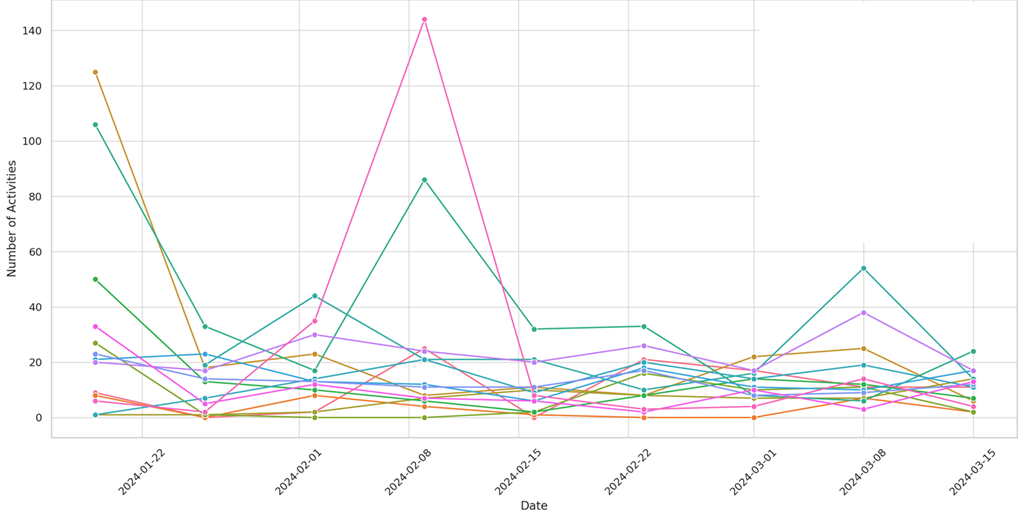
The data revealed varied patterns of user interaction. While a minority (4 out of 14) consistently leveraged the tool, suggesting an integration into their daily workflows, the majority displayed a declining trend.
This reduction in usage raises critical questions for business decision makers, since the Copilot for Microsoft 365 license is $360 per user (annually) with minimum 1-year commitment, paid up front. “If I make this investment, will people stop using it over time?”
Periodic spikes in usage among certain users indicate that while the overall trend was declining, there were instances of increased activity. In looking closer at the log data, we observed consistent use of Copilot in Teams to summarize meeting notes. For users who only use that feature, a compelling alternative would be Teams Premium which provides similar meeting summarization for only $7/user/month (75% savings over Copilot).
The Novelty Effect is a well-documented phenomenon in technology adoption, reflecting the transition from initial exploration to routine use. For Copilot for Microsoft 365, the high initial uptake followed by a gradual decline exemplifies this effect. It suggests that while the tool initially captured users' interest, maintaining sustained engagement proved challenging.
In the first test group we provided initial adoption materials (a Wiki in OneNote providing sample guidance for each productivity app). The goal was to see whether the technology itself became addictive in nature, or if there was indeed a novelty effect. Note: Your mileage may vary: our first test group is a highly technical group of consultants. Just how technical? Follow @NathanMcNulty to find out!
Observations: (out of 2,049 total Copilot Interactions)
- 37% of Copilot interactions were with Copilot for Word
- 30% of Copilot interactions were with M365 Chat
- 20% of Copilot interactions were with Teams (meeting summaries)
- 6% of Copilot interactions were with PowerPoint
How to use AI and Purview to reproduce this study in your organization
To reproduce this study, use Microsoft Purview Audit Log Search and search for “Interacted with Copilot” in the “Activities- friendly names” text box. Expand the timeframe to include the duration you want to search for.
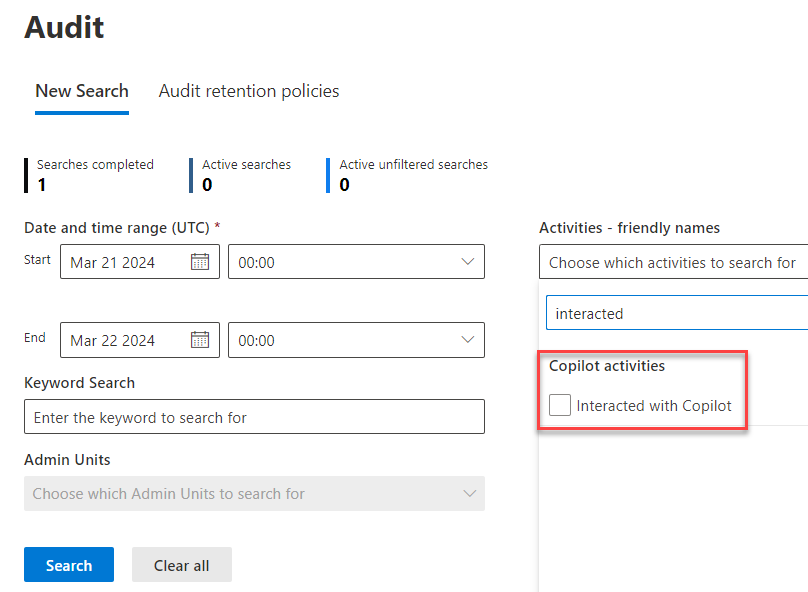
Export the results to CSV and then copy the UserId and CreationDate columns into a new CSV file.
I used ChatGPT’s “Data Analyst” GPT and fed it this prompt [which it nailed it on the first attempt!]
”This file has two columns, userid and CreationDate. The user performed an activity on a given date, and sometimes they performed multiple activities on the same date. Create a chart that aggregates those activities on a 7 day week basis. For example, the data begins on January 19th. Beginning on that day if you add 7 then you get to January 26th. The user Joe had 107 total activities between January 19th and January 26th. Show a trend of Joe's activities every 7 days, and compare that to the other users activities over the same time period.”
Additional AI Prompts I found helpful:
- “Create a bulleted list of 10 insights. For example, which users increased activities over time (trending up) Which users decreased in adoption over time Come up with 8 other insights from this trend analysis”
- “Create an executive summary“
Copilot for Excel
You may be wondering why didn’t I use Copilot for Excel? Believe me, I tried! My attempts with Copilot for Excel failed in every attempt. First, it wouldn’t allow me to upload the file from my PC, as it required the file to be in OneDrive (other AI tools do not have this limitation). Then, it did not like the CSV format, …so I had to save it to XLSX format. Then it forced me to format the data columns into a Table (extra work that other AI tools do not require). Then after all these hoops, a mea culpa!
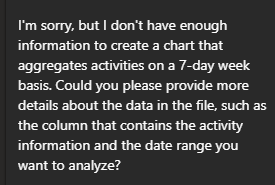
After several back and forth attempts, Copilot for Excel just couldn’t get it done. Microsoft 365 Copilot Chat also failed to render any meaningful interpretation of Purview audit log data.
This was a big surprise for me. I expected greatness from Copilot for Excel! For example, it was unable to help with basic prompts like “Aggregate the UserID column by date, create a 3rd column that contains the number of entries for the user for each day.” Fail. Fail. Fail.
After multiple attempts, I was unable to get any meaningful assistance from Copilot for Excel. Looking at the audit logs, our 14 test users gave up trying too.
Purview Audit Logs
I was impressed with Purview’s audit logs! I was able to see exactly which documents were retrieved by end-user Copilot interactions! It listed the document names and paths that I was able to verify had the proper access control restrictions (Copilot will faithfully provide any document that the user searches for, so you have to make sure your ACL’s are not too broad!)
Next Steps
We are planning a second study that will involve a different group of employees, monitored over the same duration, who will receive weekly adoption materials. This approach aims to evaluate whether consistent engagement strategies can mitigate the Novelty Effect. The hypothesis is that regular, targeted communication will help sustain user interest and integration of the tool into daily activities.
Copilot Resources
- Copilot Adoption Success Kit
- Copilot Lab (Prompt Guide)
- Copilot Service Description (Feature Availability)
- Zero Trust Guide for Copilot (helpful to know what you can do with E3 vs E5 licenses)
- Copilot Roadmap
- Message Center Posts about upcoming changes in Copilot
- Microsoft Purview data security and compliance protections for Microsoft Copilot